
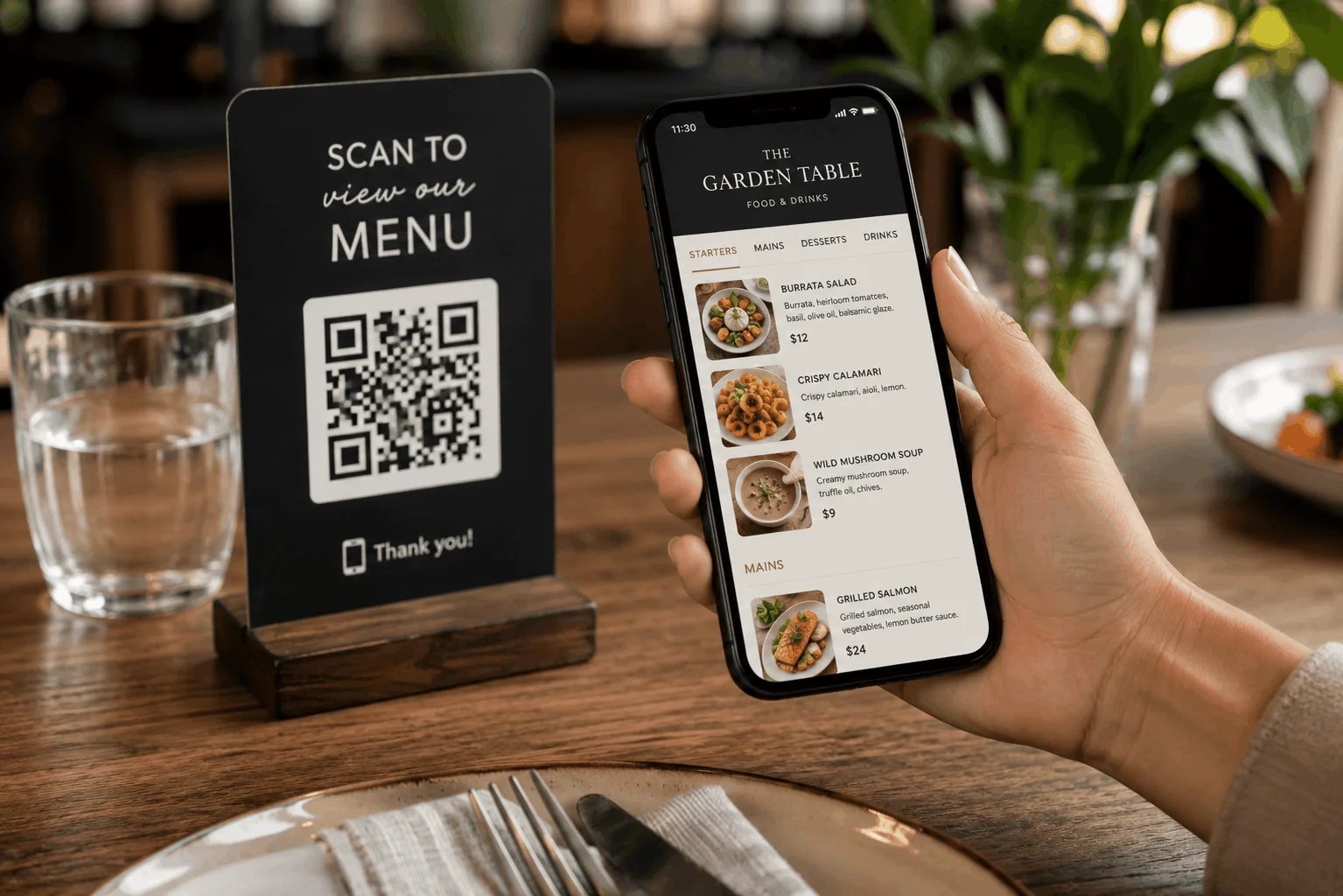
Restaurant menus are changing. Instead of handing every guest a printed menu, more restaurants are making their menu available online so customers can open it directly from their phone.
A digital menu for restaurants can be accessed through a QR code, a link on the restaurant's website, social media, Google Business Profile or anywhere else the restaurant wants to share it.
Unlike a printed menu or static PDF, a proper digital restaurant menu can be updated whenever something changes. Prices can be edited, sold-out dishes can be hidden, seasonal items can be added and new photos or descriptions can be published without printing another menu.
In this guide, we'll explain what digital menus are, how restaurants use them and what to consider when creating one for your own restaurant.
What is a digital menu in a restaurant?
A digital menu is an online version of a restaurant's food and drink menu that customers can view on a phone, tablet or computer.
In a restaurant, customers will commonly access the menu by scanning a QR code placed on the table. The QR code opens a webpage containing the restaurant's current menu.
For example, a customer might:
- Sit down at a restaurant.
- Scan a QR code on the table using their phone camera.
- Open the restaurant's digital menu.
- Browse categories such as starters, mains, desserts and drinks.
- View dish names, descriptions, prices and photos.
- Tell the server what they'd like to order.
There is usually no app to download and no account to create.
But QR codes aren't the only way to use a digital menu. Restaurants can also share the same menu through their website, Instagram, Facebook, Google listing, email or a direct link.
How does a restaurant digital menu work?
A restaurant creates its menu using an online menu builder and adds categories such as:
- Appetizers
- Main courses
- Pizza
- Pasta
- Desserts
- Cocktails
- Wine
- Beer
- Soft drinks
Individual dishes are then added underneath those categories with information such as the name, description and price.
Once the menu is published, it gets its own web address. The restaurant can turn that link into a QR code and place the QR code around the venue.
The important difference is that the QR code points to the online menu rather than containing the menu itself.
This means the restaurant can change the content behind the QR code without replacing the QR code.
If a burger changes from $14 to $15, for example, the restaurant can update the price online. The next person who scans the same QR code sees the new price.
Digital menu vs QR code menu: what's the difference?
The terms are often used interchangeably, but technically they describe two slightly different things.
A digital menu is the actual online restaurant menu.
A QR code menu describes the way customers access that digital menu by scanning a QR code.
The same digital menu can therefore be accessed through:
- A QR code
- A website link
- Social media
- Messaging apps
- A restaurant's Wi-Fi landing page
Restaurants don't have to choose between an online menu and a QR code menu. A QR code is simply one convenient way of directing customers to the menu.
Why are restaurants using digital menus?
Printed menus work perfectly well when nothing changes.
The problem is that restaurant menus change constantly.
A restaurant might introduce seasonal dishes, change ingredient costs, run out of an item, update cocktail prices or create a special Valentine's Day menu.
With printed menus, even a small change can mean redesigning and reprinting multiple copies.
A digital menu gives restaurants more flexibility because the menu itself can change while the link customers use stays the same.
Here are some of the biggest advantages.
1. Update menu prices whenever you need
Food costs don't stay the same forever, and neither do restaurant prices.
With a printed menu, changing a single price can mean editing the design, exporting a new file and printing another batch of menus.
With a digital restaurant menu, you can edit the price directly.
That can be particularly useful for restaurants that:
- Change menus seasonally
- Regularly introduce specials
- Have changing ingredient costs
- Rotate beer or wine selections
- Run different lunch and dinner menus
- Frequently test new dishes
Instead of delaying an update because menus were only recently printed, you can keep the online version current.
2. Hide sold-out dishes
Few things are more frustrating for a customer than choosing a dish only to be told that it's unavailable.
A digital menu makes it possible to remove or hide unavailable dishes rather than leaving them visible until new menus can be printed.
When the dish becomes available again, it can simply be restored.
This is particularly useful for restaurants with changing inventories, daily specials or menus built around fresh and seasonal ingredients.
3. Reduce menu printing
Restaurants don't necessarily need to eliminate printed menus completely.
Some customers prefer them, and having a few physical menus available is still useful.
But a digital menu can significantly reduce how often those menus need to be replaced.
Instead of printing dozens of new menus whenever one price changes, restaurants can keep a smaller number of paper menus while making the digital version the primary menu.
4. Let customers see the menu before visiting
A restaurant menu isn't only useful once someone sits at a table.
Potential customers often want to see:
- What food you serve
- How much meals cost
- Whether you have vegetarian options
- What drinks are available
- Whether there's something suitable for children
- What kind of restaurant you are
An online restaurant menu can be shared before customers arrive.
Someone discovering your restaurant online can open the exact same menu that they'll see when they visit.
That makes your digital menu useful for both existing customers inside the restaurant and potential customers deciding where to eat.
5. Add better dish descriptions
Printed menus have limited space.
If every dish needs a long description, a physical menu quickly becomes crowded.
A digital menu gives you more room to explain what each dish contains.
Instead of writing:
Truffle Pasta — $19
you might write:
Truffle Tagliatelle — $19
Fresh tagliatelle with wild mushrooms, parmesan, truffle cream and fresh herbs.
Descriptions can help guests understand unfamiliar dishes and make the differences between similar menu items clearer.
6. Add food photos
Photos aren't appropriate for every restaurant, but they can be particularly useful for cafes, bakeries, food trucks, casual restaurants and cuisines where customers may not recognize every dish by name.
A digital menu makes it easier to add or remove photos without redesigning an entire printed menu.
If you're using food photography, keep it consistent. A few high-quality photographs are usually better than adding a poorly lit phone photo to every item.
7. Make menus easier for international customers
Restaurants in tourist destinations often need menus in several languages.
With printed menus, this can mean maintaining multiple versions of the same menu.
Digital menus can make it easier to offer customers different languages from the same menu experience.
This is particularly useful for:
- Hotels
- Resorts
- Airport restaurants
- Tourist destinations
- International cities
- Beach bars
- Restaurants near major attractions
Whatever system you use, translations should still be checked carefully—especially dish names, ingredients and allergen information.
8. Show more information without overcrowding the menu
A restaurant menu needs to communicate much more than a dish name and price.
Depending on the restaurant, you may want to include:
- Ingredients
- Allergens
- Dietary information
- Spiciness
- Portion information
- Vegetarian labels
- Vegan labels
- Gluten-free options
- Alcohol information
- Food photos
Trying to show everything at once on a printed page can make the menu difficult to read.
A well-designed digital menu gives you more flexibility to structure this information while keeping the main browsing experience simple.
Digital menu vs paper menu
Digital menus don't necessarily need to replace paper menus.
For many restaurants, the best approach is to use both.
Paper menus are good for:
- Customers who don't want to use their phone
- Restaurants where physical presentation is part of the experience
- Guests without mobile internet
- Simple menus that rarely change
Digital menus are good for:
- Frequent price changes
- Seasonal menus
- Large menus
- Multiple languages
- QR code access
- Online sharing
- Menus with photos
- Regularly changing dishes
The two formats can work together.
A restaurant might keep ten traditional menus available while putting QR codes on every table. Customers can then choose whichever experience they prefer.
A digital menu should not just be a PDF
One of the easiest ways to put a restaurant menu online is to upload the existing PDF and link the QR code to it.
It works, but it isn't usually the best experience.
Most restaurant PDFs were designed for A4, Letter or another large printed format. On a phone, customers may have to zoom in, move sideways and repeatedly pinch the screen just to read a dish description or price.
A proper digital menu is designed for mobile screens.
Instead of showing an entire printed page, it organizes the menu into categories and individual items that adapt to the customer's screen.
For example:
Starters
Burrata
Tomatoes, basil oil, sourdough
$12
Beef Tartare
Capers, mustard, shallots, toasted brioche
$16
Mains
Grilled Sea Bass
Potatoes, seasonal vegetables, lemon butter
$27
The customer can simply scroll instead of zooming around a PDF.
What should a good digital restaurant menu include?
Your digital menu doesn't need dozens of features. It needs to make choosing food easy.
At minimum, include:
- Restaurant name and branding
- Clear menu categories
- Dish names
- Short descriptions
- Prices
- Relevant dietary or allergen information
- Drink sections where applicable
- Easy navigation between sections
Photos can be added where they improve the experience, but don't allow visual extras to make the menu slower or harder to navigate.
The priority should always be helping the customer answer one question:
What would I like to order?
How to organize a digital restaurant menu
A digital format gives you more flexibility, but basic menu organization still matters.
Most restaurants should use familiar categories rather than inventing clever names that customers have to decipher.
For example:
Food
- Starters
- Salads
- Mains
- Burgers
- Pizza
- Sides
- Desserts
Drinks
- Cocktails
- Wine
- Beer
- Non-alcoholic drinks
- Coffee
- Tea
The exact structure depends on the restaurant.
A cafe might use Breakfast, Sandwiches, Pastries, Coffee and Cold Drinks, while a cocktail bar may primarily organize its menu by cocktails, wine, beer and snacks.
Keep the most important sections easy to find.
Digital menu design best practices
Going digital doesn't automatically create a good menu. A badly designed online menu can be just as frustrating as a badly designed printed one.
1. Keep it easy to scan
Customers usually aren't reading menus from beginning to end. They're scanning categories and comparing options.
Use clear headings and avoid large walls of text.
2. Make prices easy to find
Don't force customers to open every dish individually just to see the price.
Names, basic descriptions and prices should be available together whenever possible.
3. Avoid too many categories
Categories are useful until there are so many that navigation becomes another problem.
Try to group related items logically.
4. Write useful descriptions
Descriptions should tell customers what they actually want to know.
Focus on ingredients, preparation and the characteristics of the dish rather than filling every description with adjectives such as "delicious," "amazing" or "mouth-watering."
5. Design for phones first
Most people scanning a QR code at a restaurant will be using a smartphone.
Check your menu on an actual phone before placing your QR codes on tables.
Buttons should be easy to tap, text should be readable and customers shouldn't have to zoom.
6. Don't make customers download an app
Someone who has just sat down for lunch shouldn't need to install software simply to find out how much a sandwich costs.
The menu should open directly in their web browser.
How to create a digital menu for your restaurant
You don't need to build a website from scratch to create one.
Step 1: Collect your menu information
Prepare your:
- Categories
- Dish names
- Descriptions
- Prices
- Photos
- Dietary information
It's also a good opportunity to remove outdated items and simplify your menu.
Step 2: Create the online menu
Use a digital menu maker and enter your restaurant information. Organize dishes into logical categories and customize the design to fit your brand.
Step 3: Check the mobile version
Open the menu on several phones if possible.
Check whether:
- Text is readable
- Prices are obvious
- Categories are easy to navigate
- Images load properly
- Long dish names display correctly
Step 4: Publish the menu
Once you're happy with the menu, publish it so it has a permanent online link.
Step 5: Create your QR code
Connect a QR code to that permanent menu link.
You can then place the QR code on:
- Tables
- Menu holders
- Windows
- Counters
- Receipts
- Flyers
- Takeaway packaging
Step 6: Test the QR code
Always scan the printed version before producing dozens of table cards.
Test it from different phones and from the distance customers are likely to scan it.
Step 7: Keep the menu updated
The biggest advantage of a digital menu disappears if the information is outdated.
When a price, menu item or description changes, update the digital version as part of the same workflow.
Where should restaurants put menu QR codes?
The most obvious location is on the table, but that's not the only place where a QR menu can be useful.
Consider placing it:
- On table tents
- At the entrance
- On the restaurant window
- At the bar
- Near the ordering counter
- On printed takeaway menus
- On food packaging
- On hotel room information
- On promotional flyers
You can also share the menu link directly online without requiring customers to scan anything.
Are digital menus only for restaurants?
No. The same format works for almost any food or hospitality business.
Digital menus can be used by:
- Cafes
- Bars
- Cocktail bars
- Bakeries
- Food trucks
- Ice cream shops
- Hotels
- Pizzerias
- Catering businesses
- Breweries
- Beach bars
- Pop-up restaurants
The structure simply changes depending on what you're selling.
A cocktail bar needs sections for drinks and spirits, while an ice cream shop might organize its menu by cones, cups, flavors, toppings and milkshakes.
Are digital menus better for restaurants?
That depends on how the restaurant operates.
If your menu never changes, your customers prefer printed menus and you have no need to share the menu online, going completely digital may offer relatively little benefit.
But if you're frequently changing dishes or prices, serving international guests or want customers to find your menu before arriving, a digital menu can make menu management considerably simpler.
It doesn't need to be an either-or decision.
For many restaurants, the most practical setup is a digital menu as the main, always-current version with printed menus available for customers who want them.
Create a digital restaurant menu
Creating a digital menu doesn't need to involve rebuilding your entire restaurant website.
With MMMMenu, you can create an online menu, organize your dishes and drinks, customize how it looks and share it using a link or QR code.
When something changes, update your menu once instead of redesigning and reprinting it.
Frequently asked questions about digital menus in restaurants
What is a digital menu in a restaurant?
A digital restaurant menu is an online menu that customers can open on a phone, tablet or computer. Inside a restaurant, it is commonly accessed by scanning a QR code placed on the table.
How do digital restaurant menus work?
The restaurant publishes its menu online and creates a QR code that links to it. Customers scan the code with their phone and the menu opens in their browser. The restaurant can update dishes and prices without changing the QR code.
Do customers need an app to use a digital menu?
A good web-based digital menu should not require an app. Customers can scan the QR code and open the menu directly in their phone's browser.
What is the difference between a digital menu and a QR menu?
A digital menu is the online menu itself. A QR menu usually refers to a digital menu accessed through a QR code. The same digital menu can also be opened through a regular web link.
Can restaurants still offer paper menus?
Yes. Digital and printed menus can be used together. Restaurants can make QR codes available on tables while keeping physical menus for customers who prefer them.
Is a PDF considered a digital menu?
Technically, a PDF menu is digital, but it isn't necessarily optimized for customers using phones. A mobile-friendly online menu adapts to smaller screens and lets customers browse categories without repeatedly zooming in and out.
Can I change a digital menu after printing the QR code?
Yes, provided the QR code points to a permanent menu URL. You can update the information on that page while continuing to use the same QR code.
How do I create a digital menu for my restaurant?
Start by adding your categories, dishes, descriptions and prices to an online menu builder. Publish the menu, generate a QR code linked to it and place the code where customers can easily scan it.